
The Productivity Tool Every Solopreneur Needs
When you’re running a business solo from home, every second counts. Between managing client communications, creating content, handling social media, and actually delivering your services, the daily grind of repetitive tasks can eat away at your most valuable resource: TIME. Enter the Elgato Stream Deck Neo, a compact productivity powerhouse that’s making waves beyond its streaming origins.
What Is the Stream Deck Neo?
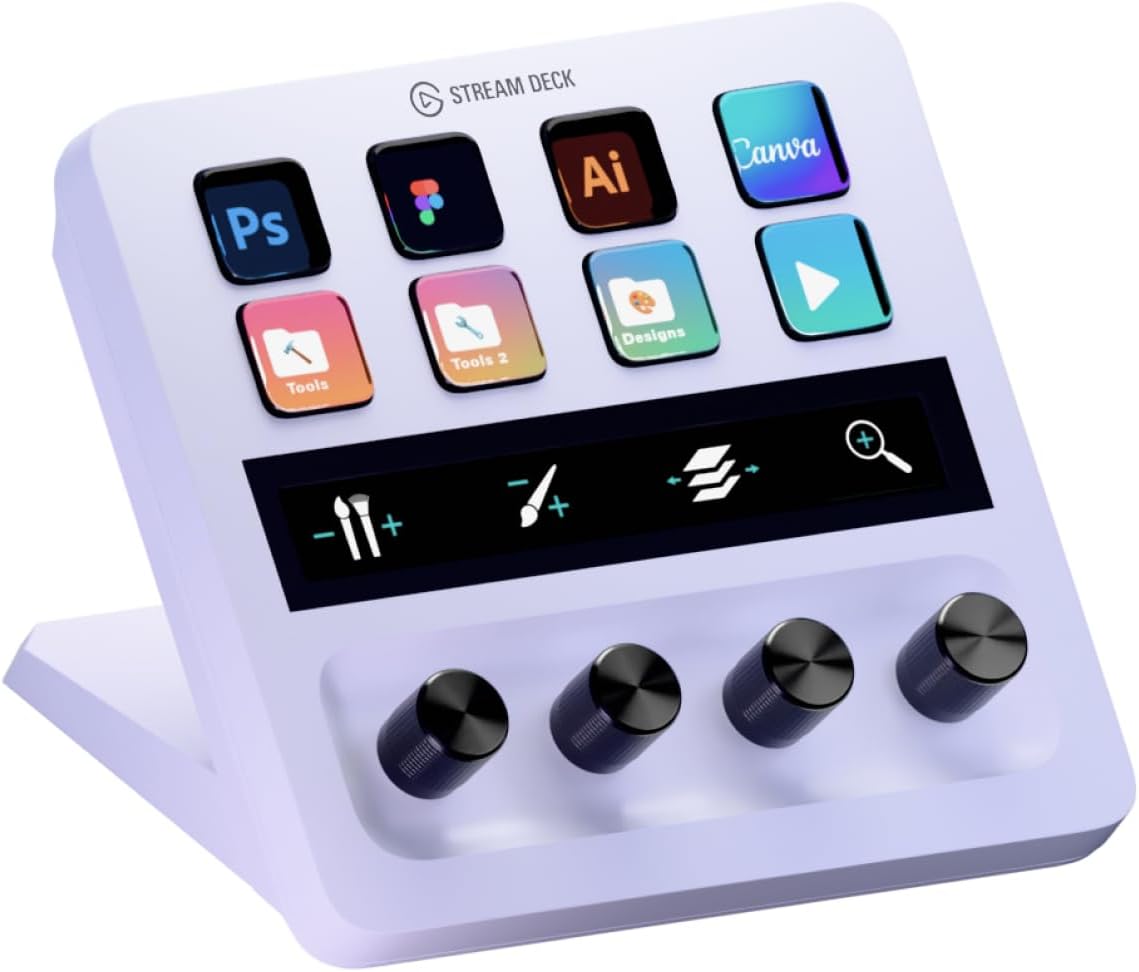
The Stream Deck Neo is Elgato’s most accessible entry into the world of customizable control panels. Launched in April 2024 as part of their budget-friendly Neo product line, this device features eight customizable LCD keys, an info bar, and two touch-sensitive buttons for scrolling through different pages of controls. At $99.99, it sits comfortably between the bare-bones Stream Deck Mini and the more feature-rich (and expensive) MK.2 model and fits inside most backpacks such as the Lovevook travel backpack
But here’s what makes it special for home business owners: it’s essentially a glorified macropad at this point that can be used for pretty much anything you’d push a button for. While “Stream Deck” might sound like it’s only for Twitch streamers and YouTubers, this device has evolved into a universal productivity tool that can transform how you work from home.
The Hardware: Small But Mighty
The Stream Deck Neo measures just 4.2 x 1.0 x 3.1 inches and weighs under half a pound, making it perfect for crowded home office desks. Unlike Elgato’s traditional black aesthetic, the Neo sports a clean white finish with rounded edges and a slightly concave face that gives it a modern, approachable look.
Each of the eight keys features its own LCD display, meaning you can customize not just what each button does, but also what it looks like. The info bar between the two touch points displays useful information like time, date, or your current page number. It comes with a built-in stand and cable, so you can plug it in and start using it immediately without hunting for additional accessories.
The two touch-sensitive buttons flanking the info bar serve as page navigation controls, allowing you to create multiple layouts and switch between them with a tap. This effectively multiplies your eight physical buttons into dozens of virtual ones.
Why Solopreneurs Should Care
As a home business owner, you’re probably juggling multiple roles: marketer, accountant, customer service rep, product creator, and CEO all rolled into one. The Stream Deck Neo helps you move faster between these different hats.
Email Management Made Easy: Set up buttons to paste canned responses for common client questions, open specific email folders, or launch your email client with a single press. No more hunting through applications or typing the same response for the tenth time today.
Video Call Superpowers: Premium video and smart features are tested and certified by Zoom. Create buttons to mute/unmute, toggle your camera, share your screen, or even trigger virtual backgrounds. For consultants and coaches who live on video calls, this alone justifies the investment.
Content Creation Shortcuts: Whether you’re writing blog posts, editing videos, or designing graphics, the Neo integrates with popular creative software. Launch Photoshop with your most-used workspace, insert frequently-used text snippets into documents, or control your music playback without leaving your creative flow.
Smart Home Integration: Running a home business means your work and living spaces overlap. Program buttons to control your smart lights, adjust room temperature, or switch scenes between “focus mode” and “meeting ready” lighting setups.
The Software: Where the Magic Happens
The Stream Deck software is where this device truly shines. The drag-and-drop interface makes customization straightforward, even if you’re not particularly tech-savvy. When you first plug in the Stream Deck Neo, there are already a couple of screens of buttons set up for you, including a “Tutorials” folder which takes you to various stream deck setup videos.
Out of the box, you can set buttons to open applications, control media playback, paste text, open websites, or execute system commands. But the real power comes from the Elgato Marketplace, which offers both free and paid plugins that extend functionality dramatically.
Popular integrations for business owners include Microsoft Office suite controls, Google Workspace shortcuts, Spotify and Apple Music controls, and specialized tools for apps like Photoshop, Excel, and PowerPoint. The software can be powerful, allowing people to link apps and different actions together in a single button press.
For instance, you could create a “Start Workday” button that opens your email client, launches your task manager, starts your time-tracking app, adjusts your smart lights to daylight mode, and begins playing your focus playlist—all with one tap.
Real-World Use Cases for Home Businesses
The Freelance Writer: Create buttons for commonly used phrases, em dashes, copyright symbols, and formatting shortcuts. Set up quick access to your research browser tabs, writing apps, and grammar checkers.
The Virtual Assistant: Program buttons for different clients with quick access to their specific folders, communication channels, and frequently needed information. Switch contexts instantly as you move between client work.
The E-commerce Seller: Set up buttons to access your store dashboard, customer service platform, inventory management system, and shipping tools. Create shortcuts for common product descriptions or response templates.
The Online Coach: Build a page dedicated to video call controls, another for content creation, and a third for administrative tasks. Move seamlessly between teaching, marketing, and business management.
The Learning Curve and Limitations
The simple design and touch points make it user-friendly, but the software could use some refinement for a smoother experience. The initial setup requires some imagination and experimentation to discover what workflows you want to automate. However, this exploration is part of the value—you’ll likely discover inefficiencies in your current processes as you think about which tasks to streamline.
The main hardware limitation is the built-in, non-replaceable cable. If you need more cable length or the flexibility to swap it out, you’ll need to factor in a USB extension. Additionally, while eight buttons might seem limiting at first, the page navigation system effectively removes this constraint for most users.
Is It Worth the Investment?
At $99.99, the Stream Deck Neo isn’t an impulse buy, but for busy solopreneurs, the time savings can quickly justify the cost. It feels like a fully-finished product that has reached its final form, and the robust software support means it will continue to grow more useful as your business evolves.
The question to ask yourself: How much is your time worth? If automating repetitive tasks saves you even 15 minutes per day, that’s over 90 hours per year—essentially two full work weeks reclaimed. For home business owners billing their time or constantly fighting against the clock, that’s invaluable.
Final Thoughts
The Elgato Stream Deck Neo represents a shift in how we think about computer interfaces. Instead of memorizing keyboard shortcuts or navigating through multiple menu layers, you get visual, tactile buttons that do exactly what you need with a single press.
For solopreneurs and home business owners, it’s never been this easy, you feel unstoppable. The Neo won’t magically solve all your productivity challenges, but it will eliminate dozens of small frictions throughout your day. And in the world of solo entrepreneurship, where you’re the entire team, those small improvements compound into significant competitive advantages.
Whether you’re managing client calls, creating content, or juggling administrative tasks, the Stream Deck Neo gives you back something precious: control over your workday, one button at a time.
About the Author